
4,925
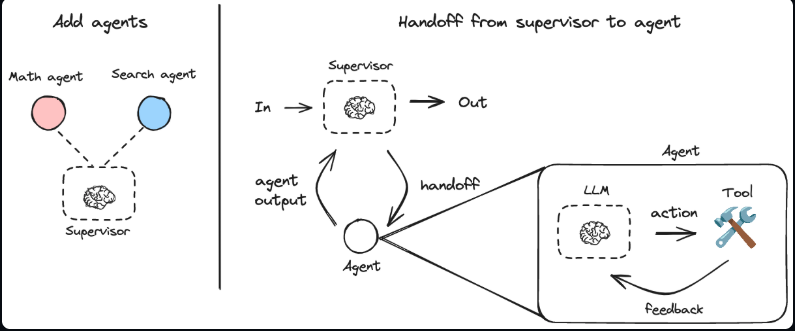
📌 OpenAI Agent SDK나 Google ADK는 멀티 에이전트 구축 시 정해진 아키텍처를 따라야 합니다. 이 경우 Supervisor 방식을 적용하고 있으며, 이는 메인 Agent가 하나 있고 통제권을 하위 Agent에 넘기는 방식(handoff)입니다.
LangGraph는 다른 프레임워크와 달리 정해진 아키텍처를 따라야 할 필요도 없고, 커스텀 아키텍처를 구현할 수 있습니다.
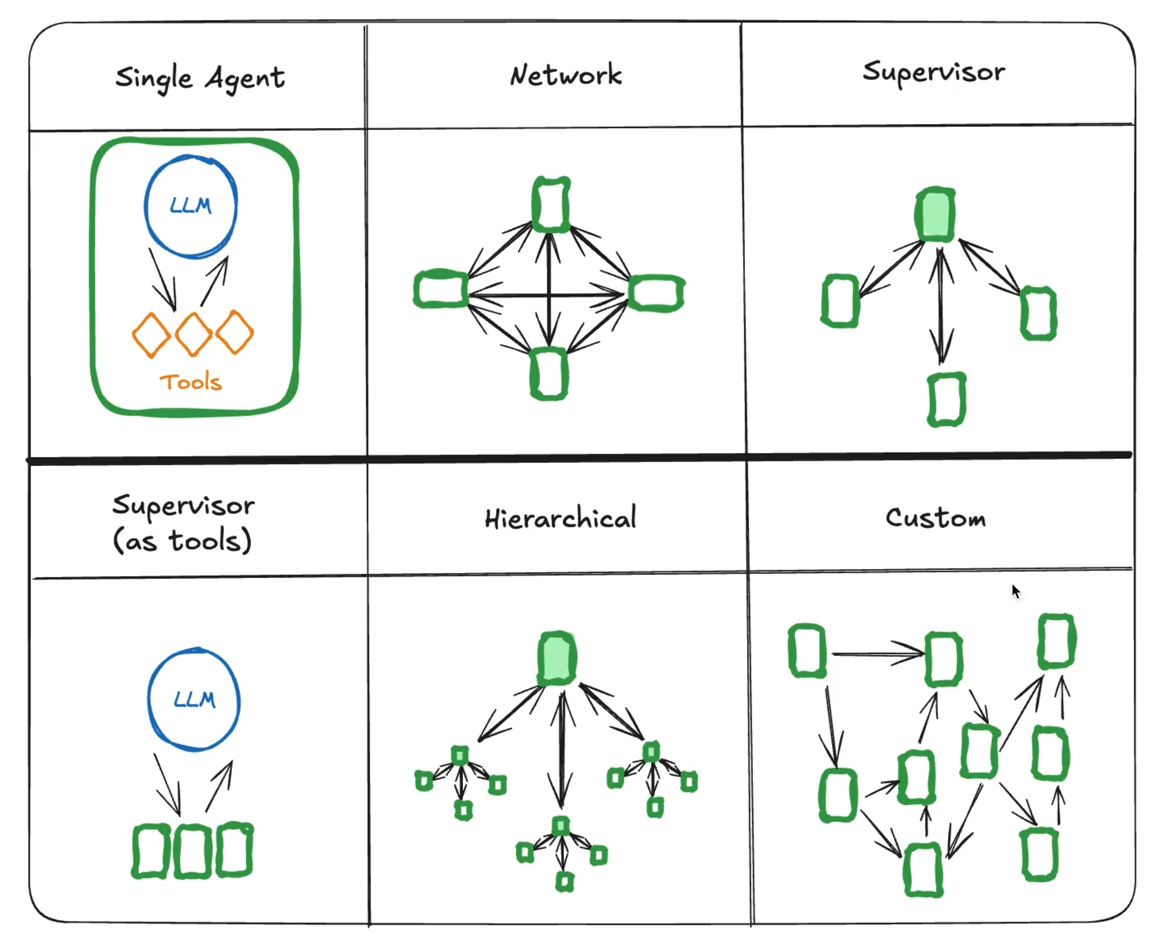
위 내용은 과거 공식문서의 내용이며, 최근에는 그래프의 위상을 기준으로 하지 않고 노드의 제어권을 기준으로 하여 관점의 변화가 있었습니다.
| 과거 (그래프 위상 기준) | 최근 (제어권 기준) |
|---|---|
| Single Agent | Skills |
| Network | Handoffs |
| Supervisor | Subagents |
| Supervisor (as tool) | Router |
| Hierarchical | Custom workflow |
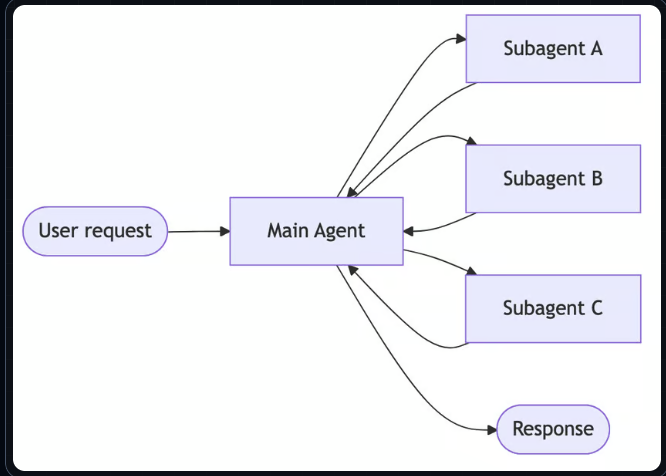
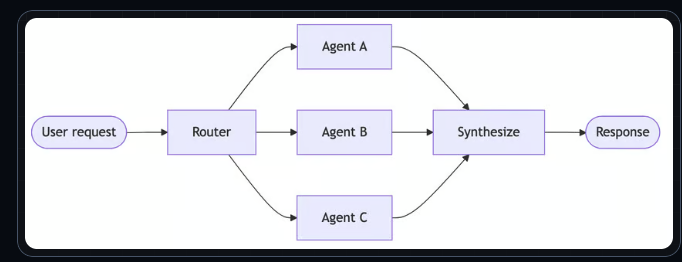
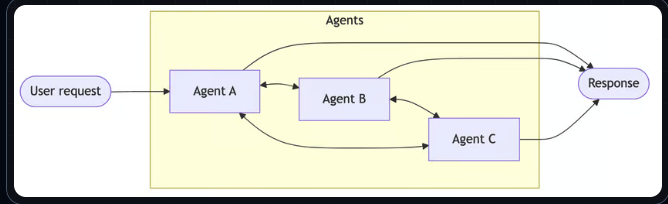
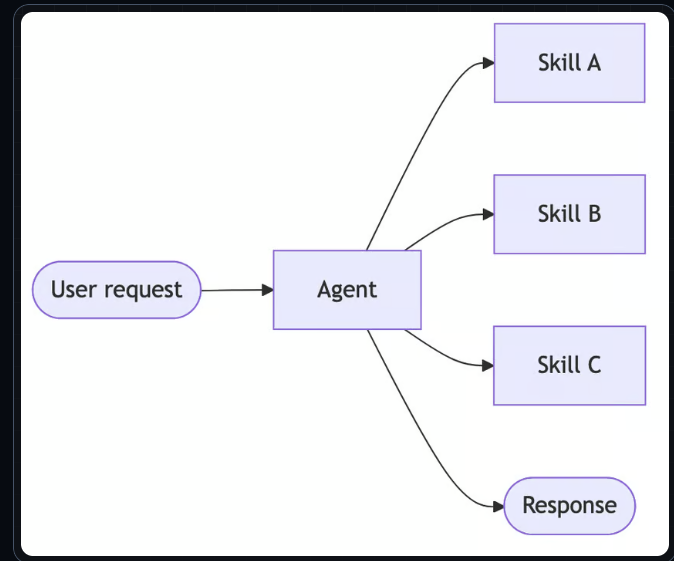
💬 이 글은 과거 그래프의 위상을 기준으로 한 멀티에이전트 아키텍처 기준으로 설명합니다. (기능 동작은 동일)
여러 에이전트가 있고 계층 구조 없이 서로 연결되어 있으며, 모두가 같은 tool을 가지고 대화나 통제권을 다른 에이전트에게 넘기는 형태입니다.
위 이미지에서 각각의 사각형은 START, LLM 노드, Tool 노드, END 노드가 있는 그래프입니다.
💡 그래프의 Node도 그래프가 될 수 있다 → 그래프 안에 다른 그래프를 Node로 가질 수 있다.
네트워크 아키텍처를 구성하는 각 에이전트도 그래프이고 이들을 연결하는 것 또한 그래프입니다. (각 에이전트를 **하위 그래프(subgraph)**로 보고, 이들을 연결하는 것을 큰 그래프로 볼 수 있음)이를 위해 큰 그래프를 먼저 생성하고, 하위 그래프는 컴파일된 그래프를 리턴하는 함수로 생성합니다.
from langgraph.graph import StateGraph, START, END
from langgraph.types import Command
from langgraph.graph.message import MessagesState
# ToolNode : 마지막 AI 메세지의 tool_calls를 읽어 실제 툴을 실행해주는 prebuilt(미리 만들어진) 노드
from langgraph.prebuilt import ToolNode, tools_condition
# tool 데코레이터 : handoff tool 생성
from langchain_core.tools import tool
from langchain.chat_models import init_chat_model

# MessagesState를 상속해서 messages + 커스텀 필드 2개를 가진 State를 정의.
# 부모 그래프와 각 서브그래프(에이전트)가 같은 State 스키마를 쓰기 때문에 서브 그래프가 반환한 상태 업데이트가 부모로 그대로 전파됨.
class AgentsState(MessagesState):
    current_agent: str
    transfered_by: str

llm = init_chat_model("openai:gpt-4o")
💡
MessagesState를 상속하면messages필드에add_messages리듀서가 이미 붙어 있습니다. 각 노드가{"messages": [response]}를 반환하면 덮어쓰기가 아니라 기존 대화에 append되는 이유입니다.
에이전트 팩토리는 ReAct 루프를 가진 그래프를 만들어 컴파일해서 돌려줍니다.
# 에이전트 팩토리
def make_agent(prompt, tools):
    # agent_node
    def agent_node(state: AgentsState):
        # LLM에 tool 바인딩 -> 툴 스키마를 실어 보내서 LLM이 이런 툴을 쓸 수 있다고 인지하게 됨.
        llm_with_tools = llm.bind_tools(tools)

        # invoke가 돌아오면 AIMessage이고, LLM이 툴을 쓰기로 했다면 .tool_calls에 호출 내역이 들어 있음.
        response = llm_with_tools.invoke(
            f"""
        {prompt}

        You have a tool called 'handoff_tool' use it to transfer to other agent, don't use it to transfer to yourself.

        Conversation History:
        {state["messages"]}
        """
        )
        return {
            # reducer 덕분에 기존 대화에 append
            "messages": [response]
        }

    # ReAct 루프 : agent -> (툴 있으면) tools -> agent -> (툴 없으면) END.
    # Agent 생성
    agent_builder = StateGraph(AgentsState)

    # node 생성
    agent_builder.add_node("agent", agent_node)

    # ToolNode 생성
    # 메세지에 Tool을 호출하는 내용이 있는지 확인하고 있으면 해당 툴 호출.
    agent_builder.add_node(
        "tools",
        ToolNode(tools=tools),
    )

    # edge 생성
    agent_builder.add_edge(START, "agent")
    # tools_condition : 미리 만들어진 함수, 호출되어야 하는 tool이 있는지 확인. 있으면 "tools" 반환. 없으면 END 반환
    agent_builder.add_conditional_edges("agent", tools_condition)
    agent_builder.add_edge("tools", "agent")
    agent_builder.add_edge("agent", END)

return agent_builder.compile()모든 에이전트가 같은 handoff tool을 공유합니다. 자기 자신에게 전환하려는 시도는 가드로 막습니다.
# 모든 에이전트가 사용할 수 있는 통제권을 넘기는 Tool 생성
@tool
def handoff_tool(transfer_to: str, transfered_by: str):
    """
    Handoff to another agent.

    Use this tool when the customer speaks a language that you don't understand.

    Possible values for `transfer_to`:
    - `korean_agent`
    - `greek_agent`
    - `spanish_agent`

    Possible values for `transfered_by`:
    - `korean_agent`
    - `greek_agent`
    - `spanish_agent`

    Args:
        transfer_to: The agent to transfer the conversation to
        transfered_by: The agent that transferred the conversation
    """
    if transfer_to == transfered_by:
        return {
            "error": "Stop trying to transfer to yourself and answer the question or i will fire you."
        }

    return Command(
        update={
            "current_agent": transfer_to,
            "transfered_by": transfered_by,
        },
        goto=transfer_to,
        # 이 Tool이 Agent 안에서 호출되므로 Command.PARENT 설정 필요.
        # 이 설정은 transfer_to 노드로 보내고 싶은데, 현재 그래프가 아니라 부모 그래프에서 보내고 싶다는 의미.
        graph=Command.PARENT,
    )
⚠️ 툴의 docstring은 주석이 아니라 LLM에게 전달되는 명세입니다.
@tool데코레이터는 docstring을 그대로 툴 설명(description)으로 LLM에 실어 보냅니다. 그래서transfer_to에 올 수 있는 값을 여기에 명시적으로 나열해야 LLM이 올바른 에이전트 이름을 넘깁니다. "..."처럼 비워두면 LLM이 값을 추측하게 됩니다.
💡 한국어 에이전트가 그리스어 고객을 만났을 때, 통제권이 넘어가는 전체 흐름입니다.
korean_agent서브그래프의agent노드가 실행되어 LLM을 호출합니다. LLM은 고객 언어를 이해하지 못하므로handoff_tool****을 호출하기로 결정하고, 그 결정은AIMessage.tool_calls에 담깁니다.
tools_condition이 마지막 메시지에tool_calls가 있는지 검사합니다. 있으므로"tools"노드로 분기합니다. (없었다면END)
ToolNode가tool_calls를 읽어 실제handoff_tool함수를 실행합니다.이 툴은
Command를 반환하고,graph=Command.PARENT때문에 점프 대상이 현재 서브그래프가 아니라 부모 그래프에서 해석됩니다. 부모 그래프의greek_agent노드로 이동하며,update의 값이 State에 반영됩니다.부모와 서브그래프가 같은
AgentsState스키마를 쓰므로, 갱신된messages와current_agent가 그대로 전파되어greek_agent가 대화를 이어받습니다.
✅
graph=Command.PARENT가 없으면 LangGraph는greek_agent를 현재 서브그래프 안에서 찾습니다. 서브그래프에는agent와tools노드밖에 없으므로 점프에 실패합니다. 툴이 서브그래프 내부에서 호출되기 때문에 이 설정이 반드시 필요합니다.
# 네트워크 아키텍처를 구성하는 각 에이전트도 그래프이고 이들을 연결하는 것 또한 그래프.
# 이를 위해 큰 그래프를 먼저 생성하고 하위 그래프는 컴파일된 그래프를 리턴하는 함수로 생성.
graph_builder = StateGraph(AgentsState)

# node로 이루어진 그래프가 있고, make_agent 함수로 Agent를 생성하고 그래프를 만들어서 리턴
graph_builder.add_node(
    "korean_agent",
    make_agent(
        prompt="You're a Korean customer support agent. You only speak and understand Korean.",
        tools=[handoff_tool],
    ),
    destinations=("greek_agent", "spanish_agent"),
)
graph_builder.add_node(
    "greek_agent",
    make_agent(
        prompt="You're a Greek customer support agent. You only speak and understand Greek.",
        tools=[handoff_tool],
    ),
    destinations=("korean_agent", "spanish_agent"),
)
graph_builder.add_node(
    "spanish_agent",
    make_agent(
        prompt="You're a Spanish customer support agent. You only speak and understand Spanish.",
        tools=[handoff_tool],
    ),
    destinations=("greek_agent", "korean_agent"),
)

graph_builder.add_edge(START, "korean_agent")

graph = graph_builder.compile()
💬 에이전트 사이에는 **
add_edge**로 만든 연결이 하나도 없습니다. 이동은 전부handoff_tool의Command로 일어나므로,destinations는 그래프 시각화를 위한 힌트일 뿐 동작에는 영향을 주지 않습니다.
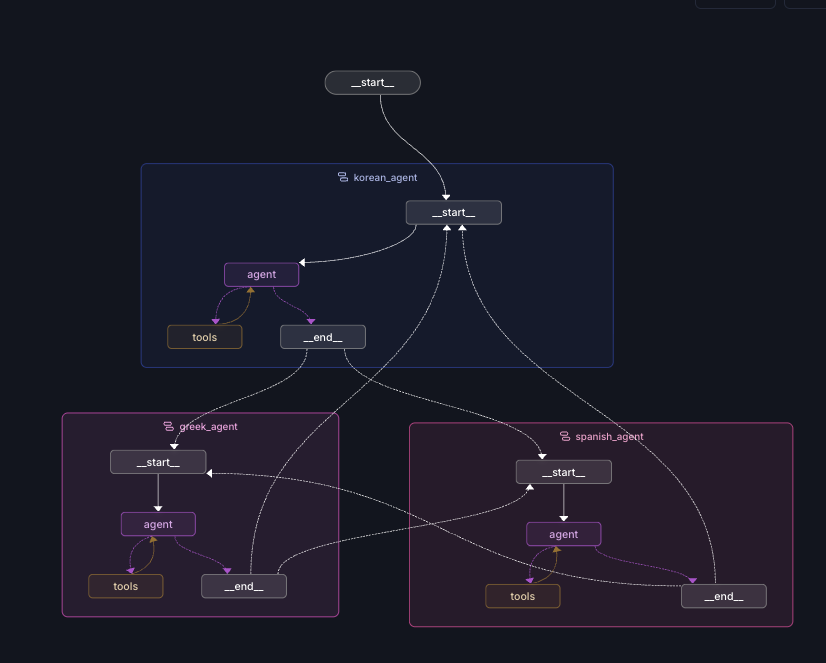
노트북 대신 graph.py 모듈로 빼고 langgraph.json을 두면 LangGraph Studio에서 그래프를 볼 수 있습니다.
{
  "dependencies": ["./graph.py"],
  "graphs": {
    "agent": "./graph.py:graph"
  },
  "env": ".env"
}Network 아키텍처에서 Supervisor 아키텍처로 마이그레이션 하려면, 예를 들어 유저의 요청을 받는 노드를 지정 또는 추가하고 받은 요청을 더 잘 처리할 수 있는 에이전트로 라우팅 하도록 해주면 됩니다.
즉, 항상 하나의 Node가 유저와 접점에 있고 이 Node가 Supervisor 에이전트이며, 다른 에이전트들을 하위에 두어서 부릴 수 있고 하위 에이전트들은 항상 Supervisor 에이전트에게 결과를 반환합니다. 그렇기 때문에 최근엔 Subagents라고도 합니다.
from typing import Literal
from pydantic import BaseModel
from langgraph.prebuilt.chat_agent_executor import AgentState

class SupervisorOutput(BaseModel):
    next_agent: Literal["korean_agent", "spanish_agent", "greek_agent", "__end__"]
    reasoning: str

class AgentsState(MessagesState):
    current_agent: str
    transfered_by: str
    reasoning: str
💡
next_agent의Literal에 **"__end__"**가 포함된 점에 주목하세요.__end__는 LangGraph에서END의 문자열 표현이라, supervisor가 "대화 종료"를 선택할 수 있게 됩니다. 구조화 출력이 이 4개 값만 허용하므로 LLM이 존재하지 않는 노드 이름을 지어낼 수 없습니다.
supervisor 노드는 대화 이력을 보고 누구에게 넘길지 결정합니다.
# supervisor 에이전트
# 유저가 보낸 메세지를 보고 누구에게 넘길지 알려주어야 함. (Command 활용, 다른 노드로 전달)
def supervisor(state: AgentState):
    structured_llm = llm.with_structured_output(SupervisorOutput)
    response = structured_llm.invoke(
        f"""
        You are a supervisor that routes conversations to the appropriate language agent.

        Analyse the customers request and the conversation history and decide which agent should handle the conversation.

        The options for the next agent are:
        - greek_agent
        - spanish_agent
        - korean_agent

        <CONVERSATION_HISTORY>
        {state.get("messages", [])}
        </CONVERSATION_HISTORY>

        IMPORTANT:
        Never transfer to the same agent twice in a row.
        If an agent has replied end the conversation by returning __end__
    """
    )

    return Command(
        goto=response.next_agent,
        update={"reasoning": response.reasoning},
    )
이번엔 하위 에이전트가 handoff tool을 갖지 않습니다(tools=[]). 통제권 이동은 오직 supervisor만 결정합니다.
graph_builder = StateGraph(AgentsState)

graph_builder.add_node(
    "supervisor",
    supervisor,
    destinations=(
        "korean_agent",
        "spanish_agent",
        "greek_agent",
        END,
    ),
)

graph_builder.add_node(
    "korean_agent",
    make_agent(
        prompt="You're a Korean customer support agent. You only speak and understand Korean.",
        tools=[],
    ),
)
graph_builder.add_node(
    "greek_agent",
    make_agent(
        prompt="You're a Greek customer support agent. You only speak and understand Greek.",
        tools=[],
    ),
)
graph_builder.add_node(
    "spanish_agent",
    make_agent(
        prompt="You're a Spanish customer support agent. You only speak and understand Spanish.",
        tools=[],
    ),
)

graph_builder.add_edge(START, "supervisor")
# 서브에이전트들은 무조건 supervisor 에이전트에게 돌아가야 함.
graph_builder.add_edge("korean_agent", "supervisor")
graph_builder.add_edge("spanish_agent", "supervisor")
graph_builder.add_edge("greek_agent", "supervisor")

graph = graph_builder.compile()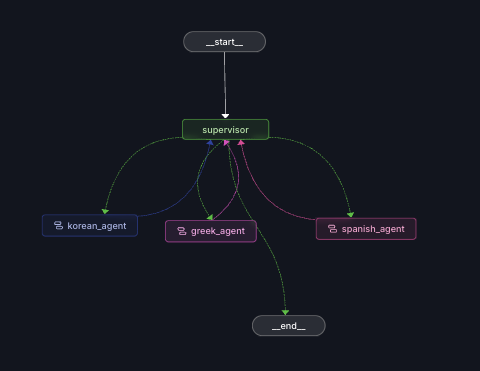
✅ 보다시피 supervisor는 단순히 요청을 뿌려주고 끝나는 게 아니라, 요청을 받아서 다른 에이전트에게 보내고, 응답을 받아서 또 뭘 해야 할지 알아내는 아키텍처입니다.
하위 에이전트 → supervisor 방향의 엣지가 이 순환을 만듭니다. 그래서__end__종료 조건이 없으면 무한 루프가 됩니다.
supervisor와는 달리 통제권을 넘기는 방식이 아니라, Supervisor Node가 하위 에이전트들을 단지 Tool로서 호출만 하고 통제권을 넘기지 않습니다.
💬 Supervisor vs Supervisor as Tool의 차이
Supervisor는Command(goto=...)로 제어권 자체를 하위 에이전트에게 넘겼다가 돌려받습니다. 반면 Router는 하위 에이전트를 평범한 함수처럼 호출하고 결과값(문자열)만 받습니다 — 제어권은 계속 supervisor에 머뭅니다.
이때, state를 Tool에 주입하려면 아래와 같이 합니다. (Tool에 파라미터를 넣어주면 AI가 그걸 활용하는데, 이를 응용하여...)
💡
Annotated[dict, InjectedState]→agent_tool이 호출될 때, 여기에 랭그래프가 현재 state를 주입해줍니다.
핵심은InjectedState****로 표시된 파라미터는 LLM에게 보이지 않는다는 점입니다. LLM은 이 툴이 인자가 필요 없다고 인식하고, 실제 값은 런타임에 LangGraph가 채웁니다. 덕분에 LLM이 대화 전체를 다시 받아쓰지 않아도 하위 에이전트가 전체 맥락을 볼 수 있습니다.
에이전트를 만들어 툴로 감싸서 리턴하는 팩토리입니다.
from typing import Annotated
from langgraph.prebuilt import InjectedState, ToolNode, tools_condition

def make_agent_tool(tool_name, tool_description, system_prompt, tools):

    def agent_node(state: AgentsState):
        llm_with_tools = llm.bind_tools(tools)
        response = llm_with_tools.invoke(
            f"""
        {system_prompt}

        Conversation History:
        {state["messages"]}
        """
        )
        return {"messages": [response]}

    agent_builder = StateGraph(AgentsState)

    agent_builder.add_node("agent", agent_node)
    agent_builder.add_node(
        "tools",
        ToolNode(tools=tools),
    )

    agent_builder.add_edge(START, "agent")
    agent_builder.add_conditional_edges("agent", tools_condition)
    agent_builder.add_edge("tools", "agent")
    agent_builder.add_edge("agent", END)

    agent = agent_builder.compile()

    # tool 커스터마이징 -> tool 이름와 설명을 설정해줌.
    @tool(
        name_or_callable=tool_name,
        description=tool_description,
    )
    # Annotated[dict, InjectedState] -> agent_tool이 호출될 때, 여기에 랭그래프가 현재 state를 주입해줌.
    def agent_tool(state: Annotated[dict, InjectedState]):
        result = agent.invoke(state)
        return result["messages"][-1].content

    return agent_tool
💡
agent.invoke(state)로 하위 에이전트를 직접 호출하고,result["messages"][-1].content로 마지막 답변만 문자열로 반환합니다. 하위 에이전트의 내부 대화는 부모 State에 섞이지 않고, supervisor는 결과만 툴 응답으로 받습니다.
각 언어 에이전트가 이제 툴 목록이 됩니다.
tools = [
    make_agent_tool(
        tool_name="korean_agent",
        tool_description="Use this when the user is speaking korean",
        system_prompt="You're a korean customer support agent you speak in korean",
        tools=[],
    ),
    make_agent_tool(
        tool_name="spanish_agent",
        tool_description="Use this when the user is speaking spanish",
        system_prompt="You're a spanish customer support agent you speak in spanish",
        tools=[],
    ),
    make_agent_tool(
        tool_name="greek_agent",
        tool_description="Use this when the user is speaking greek",
        system_prompt="You're a greek customer support agent you speak in greek",
        tools=[],
    ),
]
supervisor는 이제 특별할 게 없는 평범한 ReAct 에이전트입니다. 구조화 출력도, Command도 필요 없습니다.
def supervisor(state: AgentState):
    llm_with_tools = llm.bind_tools(tools=tools)
    result = llm_with_tools.invoke(state["messages"])
    return {
        "messages": [result],
    }


graph_builder = StateGraph(AgentsState)

graph_builder.add_node("supervisor", supervisor)
graph_builder.add_node("tools", ToolNode(tools=tools))


graph_builder.add_edge(START, "supervisor")
graph_builder.add_conditional_edges("supervisor", tools_condition)
graph_builder.add_edge("tools", "supervisor")
graph_builder.add_edge("supervisor", END)


graph = graph_builder.compile()
✅ 전체 그래프가 에이전트 하나와 툴 노드 하나로 단순해졌습니다. 언어 에이전트들은 더 이상 부모 그래프의 노드가 아니라 툴 안에 숨어 있습니다. Router 방식이 구조적으로 가장 단순한 이유입니다.
Hierarchical(계층적) 아키텍처는 최상단의 supervisor 에이전트가 하위의 supervisor 에이전트들을 관리하고, 하위 supervisor 에이전트는 다른 하위 에이전트들을 관리하기 때문에 매우 복잡합니다.
위에서 했던 멀티 에이전트 아키텍처에 대해, LangGraph에는 이미 내장된 Agent 구현체가 있습니다. 거기엔 supervisor와 **swarm(=network)**이 구현되어 있습니다. 이를 활용하면 훨씬 간단하게 멀티 에이전트 아키텍처를 구현할 수 있습니다.
pip install langgraph-supervisor langchain-openaisupervisor를 만드려면 create_supervisor 함수에 agents, model, prompt를 넣고 컴파일하면 됩니다.
💡 아래 코드에서 **
create_react_agent**는 Agent를 만들어줍니다. 즉, agent node, tools node가 있는 그래프를 만들어줍니다. 위에서 직접 만들었던make_agent/agent_node역할을 대체한다고 보면 됩니다.
from langchain.chat_models import init_chat_model
from langgraph.prebuilt import create_react_agent
from langgraph_supervisor import create_supervisor

MODEL = "openai:gpt-4o-mini"

history_agent = create_react_agent(
    model=MODEL,
    tools=[],
    name="history_agent",
    prompt="You are a history expert. You only answer questions about history."
)
geography_agent = create_react_agent(
    model=MODEL,
    tools=[],
    name="geography_agent",
    prompt="You are a geography expert. You only answer questions about geography."
)

supervisor = create_supervisor(
    agents=[
        history_agent,
        geography_agent
    ],
    model=init_chat_model(MODEL),
    prompt="""
    You are a supervisor that routes student questions to the appropriate subject expert.
    You manage a history agent and a geography agent.
    Analyze the student's question and assign it to the correct expert based on the subject matter:
    - history_agent: For historical events, dates, historical figures
    - geography_agent: For locations, rivers, mountains, countries
    """
).compile()

questions = [
    "....",
    "....",
    "...."
]

for question in questions:
    result = supervisor.invoke({
        "messages": [
            {"role": "user", "content": question}
        ]
    })
    if result["messages"]:
        for message in result["messages"]:
            message.pretty_print()
⚠️ prompt에 적은 에이전트 목록과 **
agents**에 등록한 목록은 반드시 일치해야 합니다.
create_supervisor는agents****에 등록된 에이전트로만 handoff 툴을 생성합니다. 등록하지 않은 에이전트를 prompt에서 라우팅 대상으로 지시하면, LLM에게는 호출할 툴이 없는 목적지를 알려주는 셈이라 해당 질문의 라우팅이 실패합니다. 에이전트를 추가하려면create_react_agent로 만들어agents리스트에도 반드시 등록하세요.
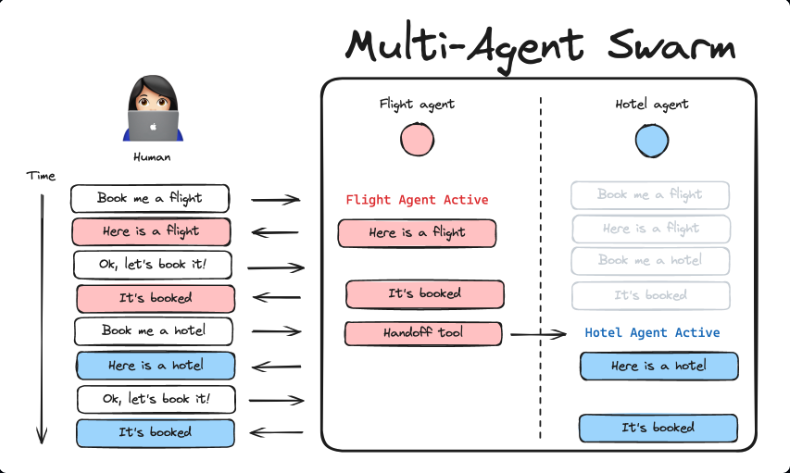
create_swarm은 이전에 구현해본 Network입니다. 이것도 마찬가지로 에이전트를 생성하고 create_swarm에 agents, default_active_agent(시작 노드 다음에 이어지는 노드)만 넘겨주면 됩니다.
또한, create_handoff_tool****도 제공이 되어서 전에 직접 만들었던 handoff tool을 손쉽게 만들 수 있습니다.
pip install langgraph-swarm💡 Supervisor 섹션은
create_react_agent(langgraph.prebuilt****), Swarm 섹션은create_agent(langchain.agents****)를 씁니다.
후자가 LangChain 1.0의 새 진입점이며,langgraph-swarm공식 예제가 사용하는 방식입니다. 인자 이름도 다릅니다 —create_react_agent는prompt=,create_agent는system_prompt=를 받습니다.
from langchain_openai import ChatOpenAI

from langgraph.checkpoint.memory import InMemorySaver
from langchain.agents import create_agent
from langgraph_swarm import create_handoff_tool, create_swarm

model = ChatOpenAI(model="gpt-4o")

def add(a: int, b: int) -> int:
    """Add two numbers"""
    return a + b

alice = create_agent(
    model,
    tools=[
        add,
        create_handoff_tool(
            agent_name="Bob",
            description="Transfer to Bob",
        ),
    ],
    system_prompt="You are Alice, an addition expert.",
    name="Alice",
)

bob = create_agent(
    model,
    tools=[
        create_handoff_tool(
            agent_name="Alice",
            description="Transfer to Alice, she can help with math",
        ),
    ],
    system_prompt="You are Bob, you speak like a pirate.",
    name="Bob",
)

checkpointer = InMemorySaver()
workflow = create_swarm(
    [alice, bob],
    default_active_agent="Alice"
)
app = workflow.compile(checkpointer=checkpointer)

config = {"configurable": {"thread_id": "1"}}
turn_1 = app.invoke(
    {"messages": [{"role": "user", "content": "i'd like to speak to Bob"}]},
    config,
)
print(turn_1)
turn_2 = app.invoke(
    {"messages": [{"role": "user", "content": "what's 5 + 7?"}]},
    config,
)
print(turn_2)
💡 swarm은 마지막에 활성화된 에이전트를 기억해서, 다음 대화가 그 에이전트로 이어집니다. 그래서
checkpointer가 필수입니다 — 위 예제에서turn_1에서 Bob으로 넘어갔다면turn_2의 "what's 5 + 7?"은 (같은thread_id이므로) Bob이 먼저 받고, Bob이 Alice에게 handoff합니다.
| 아키텍처 | 제어권 | 핵심 도구 | Prebuilt |
|---|---|---|---|
| Network (=Handoffs) | 에이전트끼리 직접 넘김 (계층 없음) | Command(graph=Command.PARENT) | create_swarm |
| Supervisor (=Subagents) | supervisor가 넘겼다가 돌려받음 | Command(goto=...) • 구조화 출력 | create_supervisor |
| Supervisor as Tool (=Router) | 넘기지 않음 — 툴로 호출만 | Annotated[dict, InjectedState] | — |
| Hierarchical | supervisor가 supervisor를 관리 | 위 조합 (매우 복잡) | — |
🎯 세 아키텍처를 가르는 질문은 "제어권이 어디로 가는가"입니다.
Network는 에이전트끼리 넘기고, Supervisor는 넘겼다가 돌려받고, Router는 아예 넘기지 않습니다. 최근 공식문서가 위상(topology)이 아니라 제어권 기준으로 관점을 바꾼 이유가 여기에 있습니다.